


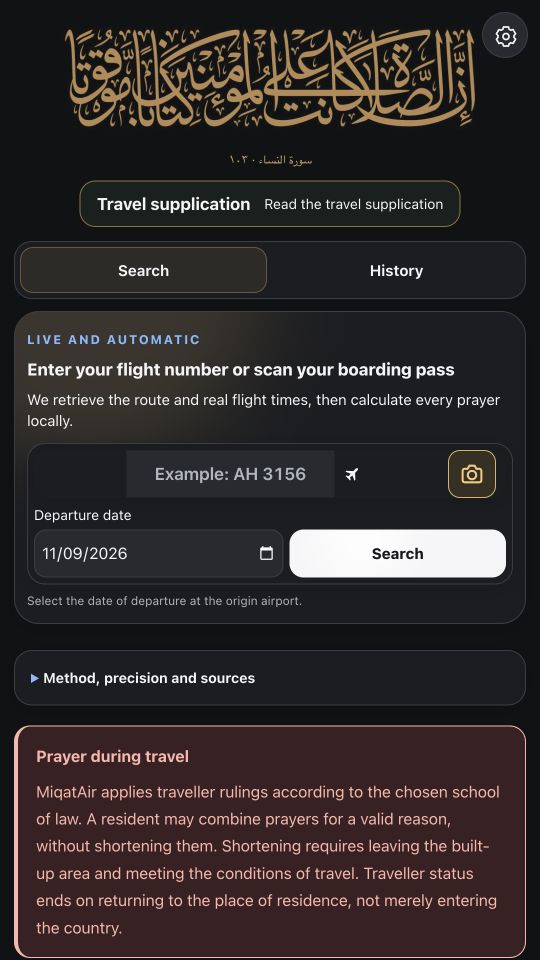
Step 1 — Install and open the app
Download MiqatAir from App Store or Google Play and select your preferred interface language from those supported.
Prepare the journey while you have a reliable internet connection, ideally before reaching the aircraft.
Step 2 — Search for the right flight
Enter the flight number and departure date, or scan a boarding pass if that feature is available. Review the itinerary and the date carefully, especially when several legs or similar flight numbers are returned.
If the flight is not found, check spelling and date before trying again.
Step 3 — Review the prayer plan and Qibla
When flight information is available, examine the prayer moments shown before departure, in the air and after landing. Open the Qibla guidance for the relevant moment.
Check whether route information is observed, scheduled, estimated or unavailable. This tells you how to interpret the result.
Step 4 — Save and choose reminders
Save the journey so that previously stored information is available offline. Enable selected prayer reminders after allowing notifications on your phone.
If the flight is delayed or its route changes, refresh the information when connectivity returns. Follow cabin crew safety instructions throughout.
Frequently asked questions
Where can I prepare my prayer plan?
Prepare your prayer plan in the MiqatAir app for iPhone or Android.
Do I need internet while flying?
Previously saved information can be viewed offline; searches and updates require connectivity.
What if my flight schedule changes?
Refresh flight data when online so the plan can be updated.